Connect With Me In Facebook

Welcome to DefendHackers, If u want to Apply for a Blogroll as a Author , With h4ckfreak Mail me @ suren.click@gmail.com

Mark Zuckerberg tells 8th graders “there’s no shortcuts” and to make friends

By h4ckfreak

Metasploit Quick Start Referennce Guide

Metasploit Quick Start Referennce Guide , By h4ckfreak

IP Security

IP Security By H4ckfreak.

15 Network Admin Apps for Android

15 Network Admin Apps for Android , By h4ckfreak

Break All OS Passwords Using KON

Break All OS Passwords Using KON , By h4ckfreak

Recover Or Reset Ur Windows Pwd Using Ubuntu

Recover Or Reset Ur Windows Pwd Using Ubuntu , By h4ckfreak

Security Blueprint For Ethical Hackers..

By h4ckfreak

Blocking IP Using IPSec

By h4ckfreak

Preventing DDos Attacks, Combat Steps abd Tools...

By h4ckfreak

Tuesday, February 22, 2011

My Thoughts About IPv6 Firewalling


It is the on-coming storm. We’ve all heard about it; it’s big, scary, and new. Public IP addresses for all and tearing down those NAT-PT barriers excites and worries many. IPv6 is coming but it’s not as frightening as it’s made out to be; most concepts from IPv4 can be applied directly to it’s younger brother. One of the ideals that IPv6 was designed around is the restoration of end-to-end connectivity of all nodes on the Internet; this introduces a certain uncertainty to how we design our firewalls under v6. We have options now, from the completely open networks geeks would love, to NATesque heavily stateful firewalls, and everything in between.
With our current version of the Internet Protocol we use private addresses heavily on internal networks protected automatically by the one way nature of NAT-PT; it has given many of us the expectation that connections cannot venture into our networks without our explicit permission. These networks are often described as castles or walled gardens, analogies referring to the strong perimeters and minmally secured interiors. We feel comfortable and secure in our walled gardens and IPv6 seems like it may rip some of that security away but this need not be the case. Regardless, the IPv4 internet is running out of addresses and IPv6 is coming; as the boyscout motto goes, ‘Be prepared’.
The paradigm of NAT is no longer the default in IPv6, the default has become every node exposed to the entirety of the internet. One extreme of the new freedom in IPv6 would be to drop all perimeter firewalling and firewall at each node. This strategy is likely a bad one but not entirely without merit. The slightly less extreme strategy of doing minimal filtering at the perimeter, purely packets that simply should not be heading into or out of any network. Things such as neighbour discovery, multicast listener discovery, Windows netbios protocols, and others. With the detailed firewalling moved to the node much of the firewalling work is widely distributed (assuming an attack didn’t focus on a single host, in that case, throttling could be done at the perimeter). One of the problems with this approach is the host firewall which would be easily torn down if the machine was compromised, inbound and outbound would be at the mercy of whoever is in control of that node. In my opinion this strategy should be at least experimented with and is probably suited to networks populated by geeks and datacenters.
On the other extreme is the heavily fortified perimeter, a well known paradigm to anyone who’s been involved in network security to any degree in the past decade. We block and/or control everything at the perimeter. SIP gateways, web proxies, stateful NAT firewalls. All this can still be accomplished under the new protocol short of hiding internal network addresses, however this would break many innovations that depend on peer to peer access. On a well configured enterprise network internet scope multicast streams may make it through but on smaller less throughly configured networks under this paradigm it may not, at present I don’t know enough about multicast routing and firewalling to say anything even remotely conclusive. The slightly less extreme version of this setup would be the good old stateful outbound only behaviour that exists in so many consumer NAT gateways.
There exist in between these two extreme ends of the firewalling world a range of happy mediums. One strategy would be to allow a certain range of ports though the perimeter for peer to peer applications such as the shared white-board application in Windows Vista. IPSec also requires end to end connectivity in a certain way and provides a secure and authenticated way to allow connections into the perimeter as IPsec can authenticate traffic and provide privacy as well. Microsoft has integrated IPSec into a remote access technology that works in a similar way to a VPN and yet subtly different, built entirely on IPv6 and IPSec technologies Microsoft’s Direct Access is an excellent example of a happy medium in the permissiveness of a perimeter.
At the end of the day it all depends on what you want from your network. A business will probably a strong perimeter, security oriented geeks could probably benefit from a node oriented firewalling strategy to make their projects and servers more flexible, and everyone will want IPsec authenticated/encrypted traffic.
Update: The Internet Architecture Board is considering IPv6 NAT in RFC 5902 in July 2010 and is discussed in a blogpost by Jeremy Stretch
Files: I’m releasing a script I wrote to generate ip6tables rules as part of this blogpost. It’s only v0.1 but I hope it will prove usable and useful to others. Suggestions and patches welcome.


http://www.mediafire.com/?4ulx64xxv4wt3s6

Report me If Link has Expired(Uploading now 2/23/2011   1.44am)

Wednesday, February 2, 2011

TEH mYTH oPh P45$w0rDs...B3+w3en Me aND My r0UT3R

Basically, I forgot my router password, and couldn't find an article on how to reset it without resetting the router, so, I got lucky, figured it out and thought I should share..

 I haven't seen an article on this anywhere on the net, and I needed to do it and I figured it out so then thought I may as well let people know what I discovered... Basically what I'll be telling you is how to reset the admin password on a router that's already been configured without resetting the whole thing.


Contents:
-------------------
1: Reasons
2: Step-by-step-story
3: Ups and Downs
-------------------


1: Reasons
----------------
I'm writing this (like I said in the pre-intro) because I haven't seen anything like it before, and thought I should let people know just in case they run into the same problem.
        

Little background is that my dad set up the router, and left the password as default, so I changed it... Dilemma = I forgot what I changed it to.

2: Step-by-step-story
-------------------------

So this is what I did:

After browsing many, many websites in the hope to find an article or tutorial on how to reset the admin password on routers without resetting the router itself.

With no luck I started thinking there must be another way.
I tried flooding it with information in the hope something would f**k up and let me in, I tried resetting it, but luckily couldn't quite get to reset properly, I tried connecting to it another way, but couldn't.. Nothing was working.

So, grudgingly I went back to trawling the web for answers... Then something rather interesting took hold of me.. I'm not sure about most routers but with mine when you go to 192.168.1.1 it has a login page, username and password and the username is only readable..                                                           
                                                                                                                                                                                                                              but the thing I briefly read didn't make sense if this were true.. It said something along the lines of "Blah.. defaul login.. blah.. admin.. blah ... username: user..blah" The user part interested me, and I knew my dad didn't know about it, since the username field was only readable and when he was searching on the config stuff nothing came up.. And then realised "Hang on a moment, the user field is only readable :(" Then it happened, a stroke of ingenuity, I opened have Firefox and had a little play with the addon WebDeveloper. Under the section for Forms there's a little option "Make all fields writeable" I clicked it... it worked, I could get rid of that 'admin' username, so I did and replaced it with "user", as you've probably worked out, if default admin username has admin as a password, I tried the default user username with user as the password.... I was in :D


And for me there was no difference in privs even though I was "user" so I went to the reset admin password page.... And then I saw something.. not so nice... "Current Password" field :( I tried 'admin' nothing. I tried 'user' nothing.. I tried giving it too many characters... Nothing. I thought I was stumped.. Angry at myself that I could even hack MY OWN ROUTER! I was thinking along the lines of" It's like it's google, or facebook or....." Then I thought "No.. It's not like those.. They have a server with PHP authentication stuff and MySQL databases.. This can't be connected to anything.. "
I had a little cheeky peek at the source code and saw something rather like treasure to a poor family.. An embed link 'password.htm' and I navigated to it, and it was exactly the same as the normal change pssword page, with the 'current password' field an everything.. I had another little cheeky peek at the source....

LOW AND BEHOLD!! IT WAS JAVAscblockedript!!!

It was a basic authentication technique used in maybe Javascblockedript 2 or 3 on hacking challenge sites.. So of course I could see my old password, that.. I'm not going to tell, just in case, and I saw the user login and there's another one called 'supporter' with the password... You guessed it.. 'supporter' and so I changed my password to something I can remember using my newly found old password, and it worked, everything was fine and dandy, so that's how I did it folks! A good 6 months or so of not being able to logon to my router for whatever reasons, rid of in about 20 minutes..

3: Ups and Downs
-----------------------
Ups and downs, life has both.
After I'd completed this, I was rather chuffed, but it got me thinking "There must be away to exploit this" then I remembered a worm that had been released (I think from Australia) that tried to brute force routers' logins and infect it, and I think it recorded data, not sure though, now, I was completely new to these new default logins, and reasoned that it would be possible to create a worm that logs in by using the other lesser-known default login, it could then navigate to the appropriate page, download the source and use RegEx or something to find the password for the admin and then infect the router and change the admin password.. Because as far as I can remember the worm I talked about tried to brute force the admin login.. So yeah, wouldn't need to this way, that might be a down-side...


Just as a quick wrap-up, I hope you enjoyed this, and I hope you learnt something new. Um.. Rate it, well, badly, comment it constructively or not, basically, do what you want with it.... Except plagiarise..and I hope it can be helpful maybe someday in the future.. Oh and by the way, my router is D-Link, it may vary for others Umm.. That's about it really.
Lat3rs....


Click Here to See :    Default Passwords DB


P.S Sorry if it's a bit rough, I wrote this off straight..

Tuesday, February 1, 2011

HACKING BLUEPRINT FOR n00b


I keep seeing the n00bs ask "How to hack" -- The folks who've been into this scene for awhile get tired of these questions. So what's a n00b to do?

Well I'm here to help.

While this short tut will not give you a step-by-step, hold-your-hand solution ( such a solution is impossible for reasons you'll find out in this text. ) This text will give you a serious guideline to developing your own techniques and methodologies for hacking.


Next I must tell you the following: With penalties for hacking going up and up all over the world, in every nation (almost) doing a sloppy hack can get you from 20 years to LIFE IMPRISONMENT. The ball game has changed since I first got into it. Security is harder and tighter, penalties are going sky high. I'm reminded of the bad-old-days of the '60's in the USA when posession of a marijuana *seed* could get you life in prison. Those days have changed for you tokers, but the 'bad old days' are right now for hackers. It's easier than ever to get caught and you'll seriously screw up your life if you do get caught.


Tell me -- is doing that DDOS or crashing some SOB who 'wronged' you or publishing those warez to be leet -- is that worth the prison time? How much reward or inducement would someone have to give you before you'd agree to rob a bank at gunpoint and risk 20 years to life in jail? Don't laugh, The penalties for armed robbery of a federal depository such as a bank and hacking your neighbor's PC are the same - 20 to life!!!


The only difference is that you stand a better chance of a reduced sentence for robbing a bank. Therefore I do not advocate you doing any exploits until and unless you really know what you are doing and are willing to take total responsibility for your actions. Bottom line -- do whatever the heck you want -- I'll not really change your mind because you won't/don't believe me and you 'know better' than I. I'll just leave you with this -- I've been hacking for 30 years now and I've never been caught nor charged - because I'm careful - I would never do any exploit without a proper investigation of the target - it's suicide.


So now I'll give you an outline of the do's and don't's as well as a little advice... Doing a real exploit involves much, much more than finding a vulnerable system and running a script to root it. Before you even consider using an exploit you must do the following MINIMUM:


1)
Ensure that you are as hidden as possible, Chain of proxies; hidden cutouts; work thru a rhost or shell on a previously rooted machine; spoofed the hell out of everything; and last but definately not least -- NEVER EVER UNDER ANY CIRCUMSTANCES RUN AN EXPLOIT FROM YOUR HOME, SCHOOL OR OFFICE. In fact never run one from an inet cafe for obvious reasons. This is because you can and will be traced if your hack is noticed. This is because, no matter what you do, no matter how well you try to hide, in order to enter and snoop around in someone's PC you *must* establish a connection from you to them. Even if you work through a chain of proxies you can be traced. Those machines have logs, the machines they connect to have logs and so on and so on. which brings us to point 2.....

2)
Clean up after yourself. This involves some very delicate surgery on the target. You should try to remove any log entries that pertain to you out of ALL logs. This is almost impossible without root access to the target. So if you got in, but didn't get root -- you could be screwed big time. Don't just erase the logs, that's way to crass. Edit the logs to remove your entries. Very time consuming, but very much worth it. Next clean up is your proxies/cut-outs, etc. Well you probably don't have root access on each machine in your chain of proxies. this is a problem because anyone who finds the first link of a back trace to one of the proxies will track you. If you can you must break the chain by destroying one or more of the proxies. This is not easy in and of itself as it involves compromising the proxy and wiping the HDD. However, even doing this you're not totally in the clear as recovery of the HDD may be possible or logs may be kept on external devices/media for that proxy. So even if you do crash it -- you're still screwed (potentially). Now to the 3rd point, how to find a suitable target...

3)
Find a vulnerable system by UNOBTRUSIVE scanning techniques. Most of the regular scanners use very blatant scanning techniques that would wake the dead. They do this because they're made for security admins to test their networks, not for hackers to be sneaky. To scan a target use a scanner that allows very fine grain control of the scanning techniques and has several different techniques. Scanners like Xscan, GFI LanGuard and the like are totally unsuited for hacking. Be sure you really know HOW to use the scanner, all it's options and how it works. Select the most delicate of scans first and go from there after analyzing the results. You may want to do several types of scans, I know I do. 4th point -- Watch your back...

4)
Get a GOOD packet sniffer. Use it to see if you're being backtraced. Set it up to watch for incomming packets not only from the target, but from at least his whole class-C subnet. In fact to be really safe, you may want to watch his class-B instead. I set my sniffer tolook at ALL incomming packets and filter to a seperate point the ones from the target and then all other incomming. I also set it to alert on any 'suspicious' packets that are common to a backtrace. In this fashion I can see if a backtrace has hit me from anywhere. If your sniffer doesn't have all these bells and whistles then do as I did and write your own. Now we start to get into the meat of hacking...

5)
Education. You could be considered an idiot if you attempt a live exploit without knowing the following:
5-A) TCP/IP: how it works; packet layout; OSI model; everything. How do expect to interpret a sniffer to see if you've been backtraced if you can't read a TCP/IP packet?
5-B] Programming: You need to be able to compile the exploit yourself; you may need to do some surgery once in the target.
5-C) Assembly Language: Since most exploits rely on shell code you must know assembly to be able to handle and fix any exploits; Assembly allows you fine-grain control of the target. If you are in a chroot jail a small assembly program can bust you out and potentially give you root.
5-D) Be an EXPERT on the target's OS: How can you be expected to do all the things needed to perform a successful exploit if you can't do simple OS functions once you get in?
5-E) Be an EXPERT with all the tools you use. Know them inside out, understand how they work and what they do. Next item....

6)
UNOBTRUSIVELY sniff AROUND the target. Look at machines potentially on the same subnet that may be monitoring the target extenally. Also examine for any firewall, routers or other network infrastructure that could potentially aid or hinder your exploit. Sniff the target for signs of an IDS (intrusion detection system). Insure the potential target is not a honeypot. Failure to examine the machines/network AROUND the target is a deadly sin. More n00bs get caught by honeypots and IDS's because they fail to take the time to properly investigate their target. investigation must not be limited to the target and its immediate surroundings either.....

                                                                7) Examine whois and other relevant records to determine the owners of the target. You might undercover a very well placed law-enforcement  
honeypot this way. LE *sometimes* doesn't set up their domains and such well ahead of time and so you might uncover a trail to point to the *real* owner or a lack of trail indicating you should be cautious. Additionally examining the whole 'paper trail' may lead you to other networks the target is affiliated with. Some of those may have an easier way in and a route to a backdoor on your original target. Mandmins feel a false sense of security behind their own firewalls and leave open access between various subnets inside. This is a weapon to exploit whenever possible. However without proper safety procedures you can be nailed very easily as you may be logged from many different directions behind the firewall.

8)
Hardware...What do you need? My recommendation is to get the smallest, lightest, tiniest laptop avalable. Sony had a tiny one that ran Win/ME, JVC has a couple small ones that they just released recently. Also you'll need various cords: phone, ethernet, USB, etc. You'll also need a phone cord for your modem that terminates in tiny alligator clips. This is to use a junction box directly to get phone service in a quiet place. The PC should have the following ports: ethernet, wireless, bluetooth, 56kb modem and USB. The idea is that everything fits into oversized coat pockets or a ditty bag under your co
at. Right now carrying a tiny computer is still not a crime ( like burglar tools), but give the feds a chance. Carry a computer - go to jail.                                                                                                                                                  

9)
Software ...What do you need? My recommendation is Linux with a hand-picked assortment of tools: scanners, sniffers, assembler, compilers and reference data on HDD. I won't go into much detail as the choice of tools is a very personal thing. Over the last 10 years or so I've been unhappy with the readily available tools and have used the available source of several to create my own versions. As you progress and are more concerned with doing an 'invisible' hack and not being noticed, you'll undoubtedly do the same. I also hesitate to recommend any of the readily bavailable tools just because of my dissatisfaction with them. While some are quite good, many do not lend themselves to stealth techniques. And last....


10) Ethics...Ah DAMN! The old fart is getting on his soapbox again. Well perhaps, but you'd do well to at least read what I have to say and *consider* my words. After all I've done more exploits than most of you put together and I still have my freedom. I must be doing something right.


10-A ) Don't do the crime if you can't do the time. By this I mean for you to understand that if you attempt an exploit against a machine that you do not have rights to -- you are breaking the law. Be a man (or woman) and be prepared to accept your punishment. Nobody told you to go out and hack, in fact I tell you not to do it. Most of you are just not capable of the attention to detail, nor do most of you posess the requisite knowledge at this time. Yes, there are exceptions to what I'm saying, however I'm writing this for n00bs, not the experienced/educated.

10-B )
The benefit of your actions must outweigh the risk. -- By this I mean to take a good, hard look at REALITY. What is the punishment if you get caught? Is it worth getting caught and suffering the punishment for what I get out of doing the deed? If you're stealing millions of dollars online -- well 20 to life is about the standard risk for grand theft. But if you're just screwing with your buddy...is that worth getting caught and convicted of a felony? Remember if you are a convicted felon - no guns - no voting - no *many* things.

10-C )
Knowledge is Power and Information is Wealth. If I have to explain this one - you're pretty dense.

10-D )
TANSTAAFL -- This is an anagram -- There Ain't No Such Thing As A Free Lunch. This basically means that you don't get something for nothing. The hacker's version of Newton's law of conservation of energy. If that target seems too good to be true - it's probably a trap. Watch you back, examine everyone's motives. You're wandering into the hacker community, keep your wits about you, not everyone nor everything is what it seems. After you've done all this then it MIGHT be safe to run that exploit. But it might not -- there are other checks that I go through, but I'm sure you get the idea. If all this seems like too much trouble and there must be an easier way -- you're right. Just log on from home, crank up xscan and find a vulnerable PC and perform that exploit. But have some snacks and drinks ready, sooner or later you'll get some visitors.

---
A reply by a member

1.what flavor of linux do you prefer for the tasks you presented us in your article ? There are LOTS and LOTS of linux distro's. Though, they all work the same, so the one you use to preform the task is up to you. Some distro's are easy to setup and use (like mandrake, www.mandrake.org), others are really customisable and/or faster but they are a lot harder to install (like gentoo, www.gentoo.org). Personally I prefer gentoo. Though, for the real experts, to have FULL control on your computer, LFS (LinuxFromScratch, www.linuxfromscratch.org) is probably best. As you may have noticed, almost every distro's have www.theirname.org as website. though some sites will link to the real sites (like mandrake). One exception is redhat, which is .com. So just try www.thedistroname.org or if it doesnt exist www.thedistroname.com. Otherwise try google.

2. the proggys for the newbies. is very important to start playing with the tools of the trade, and as easy as it seems for the people here that knows how to hack it would be nice to post at least the names of the prefered software a hakcer must use, so we the nbies can google it, or even better post (again) the link. Like Daremo said specifically, you should NEVER use a tool before you have enough knowledge. I don't have enough knowledge to use tools but I do. This highly increases my chances on getting caught. And like Daremo said, if you really want to hack you should program your own tools. Then you exactly know how they work and you can make it as obsecure as possible. Most of these tools wont be released, so there are only few. An example of a tool which can do a bit unobtrusive scanning is nmap (dont know the website), but still its not unobtrusive enough. And, why the hell would you want to port scan if you do not have enough knowledge to know what to do after the portscan?
3.when are you gonna write a tutorial for C the way you did for assemble? There are lots of tutorials for C. And good ones, too. Just look around here (ebooks, programming) and read them. And he isnt done yet with the assembler one.... is he?
4. now how you delete your tracks? where are the logs in the operating systems? Most targets for a hacker a linux boxes. Linux is -- unlike windows -- customisable. You can set the places of the logs yourself. I think even windows can do it. Though most of the times the logs will be in /var/log/. In windows I don't remember where they are. I believe somewhere like "%WINDOWSDIR%/system32/logfiles/" or "%WINDOWSDIR%/system/logfiles/" or so. Im not sure. But again, I think this can, even in windows, be changed.


YOUR COMMENTS IS LOT TO MEAN FOR ME...

How to DEAL with Hackers : A Guide "L33T or 1337"

Scared Oh Hackers, No More ..Once u Read this Post, When computers started going into fashion, people never had to worry about hackers, viruses and other computer security issues. Nowadays, the world is a very different place. People download a lot of things from the Internet and they are constantly at risk from viruses, Trojan horses and hacking. This is one of the main reasons why it is so important to learn about the fundamentals of computer security and how to stop hackers from tampering with your system.


The first thing that you will have to do is to purchase a good anti-virus system. There are many good anti-virus solutions in the market and you can pick one that you are comfortable with. After installing it into your computer, you should keep in mind that you will have to update it regularly. This is important in stopping new viruses and hacking techniques from taking advantage of the inherent vulnerabilities in your system. You should learn how to use your software and it pays to know how to quarantine, repair and delete infected files and folders.

FIREWALLS:


Your firewall is the next thing that you should pay close attention to. There are two types of firewalls; namely, software and hardware. Firewalls help users prevent hackers from accessing the files and folders on your computer. Most operating systems come with built-in firewalls. You should learn how to use your firewall as early as possible.


When improving the security of your system, you will also have to keep a close eye on system events. You can do this by regularly checking your system log for any suspicious activity. You should start getting worried if you are constantly getting notices regarding unknown programs that you did not install yourself. You should also be on the lookout for TCP/IP messages and other system warnings.

OS UPDATES:


You should also be diligent in downloading and installing operating system updates. These are very important to the security of your computer. Software providers often provide updates when they find and fix vulnerabilities and loopholes that hackers can take advantage of. Updating regularly will make it very difficult for people trying to gain access to your computer. As soon as new patches are available for your programs, you should download and install them right away. Hackers usually take advantage of the vulnerabilities in common programs like web browsers, email clients and programs like Adobe Acrobat to get into your system. Security fixes often eliminate these vulnerabilities, so hackers will have to find new loopholes to exploit your system. This game of cat and mouse between software developers and hackers has been going on for a while now and will likely continue in the future.


Hackers are now also capable of taking control of your computer’s webcam, if you have one. This is more than just a breach in computer security and your privacy is now at stake. It is a well-known fact that everything connected to your computer can be used and accessed by someone who has already gained access to your computer. 

This includes devices like microphones and webcams. In fact, a number of hackers have already been caught after successfully taking control of other people’s webcams and allowing them to see what the victims are doing.

Thankfully, webcam hacking is usually accomplished using specially-made viruses. These viruses can be detected and dealt with using any reputable anti-virus software. This is just one of the reasons why computer security is so important these days. The best way to keep prying eyes from using your webcam is still one of the simplest solutions to this security problem. All you have to do is disconnect or cover your webcam when not in use. 


BE SECURED, DEFEND HACKERS

Hackers Use Graphical Passwords To Protect them


Am Wondering all the Passwords if we set By Mixing up with Hexa Decimal values goes Broken By HACKERS...So How to defend the Hackers..Why its hard to  break hackers passwords..!! Coz they Don Put trust in Encryption Schems Like AES, MD5 Hash Mechanisms..They Believ in GPEX…Graphical Encoding Passwords..!! Hering for tha First time ..Lol..Common Lemme talk u thro this interesting post


Secure passwords have one big disadvantage: They are hard, and sometimes even impossible to remember, especially if different secure passwords are created for each web and local service. We all know some basic rules for secure passwords, like making sure that they do not contain dictionary words or words that have a special meaning to the user, have a minimum length that is considered to be secure these days and use a selection of all available characters.
Password managers also have been created to provide computer users with tools to generate and store passwords, so that in the end only one master password needs to be remembered.
So called graphical passwords, that is passwords that are created by clicking on positions in images, are an alternative to convention text based passwords. Most browsers, programs and operating systems on the other hand do not support these by default.
graphical password 
The Firefox add-on GPEX, is a first try to bring graphical passwords to the browser. The system used has been streamlined for ease of use. The add-on supports custom images and icon sets. Passwords are created or entered, by clicking on specific locations in the image or icon set.

gpex

A password strength meter indicates the strength of the password to the user. The general idea is that graphical passwords provide better security and memorability at the same time. The add-on itself converts the graphical password into a character based password, as the services on the Internet only support these kinds of passwords.
The extension can be an asset for users who do not use password managers. It is however a nice demonstration. Users who want to try the graphical password manager can install it from the official Firefox add-on repository.
I Hope u all Like it..Set ur Emotions fr tha Post Or Comment it
Click Here To Get This Add-On Related Posts with 
Thumbnails

Friday, January 28, 2011

ALL AVAILABLE JavaScript Tricks


Today, I will list some very cool JavaScript hacks and tricks that you can use creatively or just have plain fun. To make each one of these codes work, all you have to do is copy and paste it into the address bar of your browser window and hit “Enter”. So here they are :-


Play the “Lord of the Web”

This code lets you edit any page/website in real-time :) . With Firefox, you can even edit and save the modified pages to your computer. Very nifty code!
javascript:document.body.contentEditable='true'; document.designMode='on'; void 0

What I have so far:

Code:
javascript: contentBodyEditable="true".DesginMode="message"

Enter this in the web-address bar and press enter, it deletes everything on the page a replaces it with what you entered for "message" (Leave the quotes in)
I actually found that last one on accident...While trying to remember this one:

Code:
javascript: document.body.contentEditable ='true'; document.designMode='on'; void 0

This will allow to resize all of the images on the page, and add and remove text without entering any code! - All credits of the finding of this code to GreenDiamond Worlds :: Forums.
Next.

Code:
javascript: alert('message here');

Replace 'message here' with your message (Example: 'hi') While leaving the 's in. This will make a pop-up message saying your message.
Next.

Code:
javascript: back();

OR
Code:
javascript: forward();

These take you forward or back one page.
Next.

Ok this is a long one, so just copy & paste, NO EDITING:
Code:
javascript: R=0; x1=.1; y1=.05; x2=.25; y2=.24; x3=1.6; y3=.24; x4=300; y4=200; x5=300; y5=200; DI=document.getElementsByTagName("img"); DIL=DI.length; function A(){for(i=0; i-DIL; i++){DIS=DI[ i ].style; DIS.position='absolute'; DIS.left=(Math.sin(R*x1+i*x2+x3)*x4+x5)+"px"; DIS.top=(Math.cos(R*y1+i*y2+y3)*y4+y5)+"px"}R++}setInterval('A()',5); void(0);

Use this one to make all the pictures on the page fly around the screen! (Works on any page)

The Big Wheel

This piece of code pulls off all the images from your web page and rotates them in a circle. Really makes any page go naked (without its images). The best place to test is a website with many images. (Google Images for an example)
javascript:R=0; x1=.1; y1=.05; x2=.25; y2=.24; x3=1.6; y3=.24; x4=300; y4=200; x5=300; y5=200; DI=document.getElementsByTagName("img"); DIL=DI.length; function A(){for(i=0; i-DIL; i++){DIS=DI[ i ].style; DIS.position='absolute'; DIS.left=(Math.sin(R*x1+i*x2+x3)*x4+x5)+"px"; DIS.top=(Math.cos(R*y1+i*y2+y3)*y4+y5)+"px"}R++}setInterval('A()',5); void(0);
If you look carefully in the above code, its rotating the HTML “img” tag. Just replace it with “a” or “p” and watch some links or text rotate instead of images.

Tremors

Your browser will be very afraid of this code :) If the code below doesn’t seem to work, please replace > with > and < with <
javascript:function flood(n) {if (self.moveBy) {for (i = 200; i &gt; 0;i--){for (j = n; j &gt; 0; j--) {self.moveBy(1,i); self.moveBy(i,0);self.moveBy(0,-i); self.moveBy(-i,0); } } }}flood(6);{ var inp = "D-X !msagro na dah tsuj resworb rouY"; var outp = ""; for (i = 0; i &lt;= inp.length; i++) {outp =inp.charAt (i) + outp ; } alert(outp) ;}; reverse

The Calculator

In case you are not in a mood to use the standard windows calculator and want your browser to do the dirty job for you, use this code.
javascript: alert(34343+3434-222);
You can change the numbers according to your choice and also try creative complex equations. Just put your arithmetic into javascript: alert( );

Finding Spoof Websites

There are times when you are not sure that the website that you are visiting is authentic. Use this code whenever in doubt :-
javascript:alert("The actual URL is:\t\t" + location.protocol + "//" + location.hostname + "/" + "\nThe address URL is:\t\t" + location.href + "\n" + "\nIf the server names do not match, this may be a spoof.");
And finally here is something that you can only get to hear if you ever worked in a Tech Support department :(

Wednesday, January 26, 2011

Mark Zuckerberg FB fan page hacked On 26/1/2011 (Shocked News)

 Yesterday
There are some clues left by the person who hacked Mark Zuckerberg's Facebook fan page on Wikipedia – but what do they add up to ? 

Who Will Trace the Guy ?


Facebook CEO Mark Zuckerberg Facebook chief Mark Zuckerberg's fan page was hacked.

Let's follow up some of the trail left in the Mark Zuckerberg Facebook fan page hacking incident.

The only – and best clue – is the link left by the hacker in the status update posted on Zuckerberg's wall, which reads "Let the hacking begin: if facebook needs money, instead of going to the banks, why doesn't Facebook let its user invest in Facebook in a social way? Why not transform Facebook into a 'social business' the way Nobel Price [sic] winner Muhammad Yunus described it? http://bit.ly/f26rT3 What do you think? #hackercup2011"

That contains a bit.ly link. Well, you can find out what the original URL is by adding a plus on the end, so: http://bit.ly/fs6rT3+ From which we can see that about 17,000 people clicked the link. Not bad (though we have to say that Julian Assange gets more clicks when he appears on the Guardian ... but we digress).

The original, shortened link was actually: http://en.wikipedia.org/wiki/Social_business?h=d044aeb71f4e466a552708fc6e3863ef&thanksforthecup=https://www.facebook.com/photo.php%3Fpid%3D393752%26id%3D133954286636768%26fbid%3D170535036312026

Let's begin with the second part of the long link – the part that starts "thanksforthecup": it's URL-encoded (so "%3D" actually stands for the character "=", "%26" for "&") and leads to a Facebook photo page for the Hacker Cup, a competition run by Facebook itself. So the hacker is saying he thinks he should get the cup. OK, we get it.

Now, back to the first part. If you just click the link, you'll be taken to Wikipedia's page about social business. But not the latest version – to a specific version in its edit history. That is, to http://en.wikipedia.org/wiki/Social_business?h=d044aeb71f4e466a552708fc6e3863ef – which is not the same, now, as http://en.wikipedia.org/wiki/Social_business. If you open them in two tabs, or just open the first in a tab and click on the "Article" link in the top left, you'll see it. Go back and forth a couple of times and you might spot the difference. Yes? No? Have a look at this difference page, then. (And look at how it was before that edit.)

Yup, the difference is the addition in the first sentence. Usually, that reads:


"A '''social business''' is a non-loss, non-dividend company designed to address a social objective"

. But in the edited (older) version that you get sent to, the phrase

" much like [http://www.romanstwelve.net www.romanstwelve.net]"

has been added. (The square brackets turn the text into a link going out to romanstwelve.net). And what does that site do? It offers "total web consulting" and is based in Pickerington, Ohio.

Crucially, as the picture shows, that edit was only on Wikipedia for two minutes on Tuesday 25 – between 19.17EST and 19.19EST – indicating that the hacker must have created the edit with the link and then deleted it straight afterwards, but kept the link to the version he had edited. Then he encoded the link for the photo and attached it to the Wikipedia link, and stuffed the whole lot into bit.ly. Then, having got the shortened link, he went and updated the status on the fan page. The timing of the change, and its reversion, indicates that this was the same person. You don't accidentally link to an old version of a page; you'd link to the generic version.

In other words, we might be able to find the hacker if we can find out who changed the Wikipedia page. Unfortunately, it wasn't done by a registered user. But because of Wikipedia's clever tracking system, you can see the IP of non-registered users: there it is at the top of the edit page in the screenshot: 131.74.110.168. You can also see what articles machines at that IP address have edited – a very mixed bag–- and also how edits from that IP have been increasingly smacked down by Wikipedia editors (latest on that page coming from October 2009: "Please stop your disruptive editing. If you continue to vandalise Wikipedia, as you did at Lyoto Machida, you will be blocked from editing."

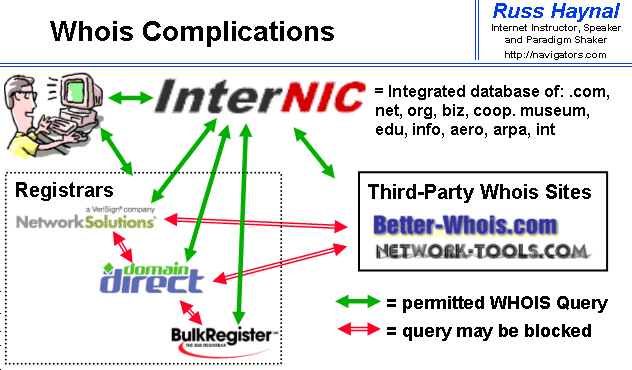
So who's behind 131.74.110.168? A quick whois query tells you that it... the US department of defence in Williamsburg.

In other words: this might be someone in the military. Most likely those edits don't come from one person – they come from all sorts of people in the Williamsburg location. Or, just as possible, it was someone who had hacked into the computers there from outside (not as difficult as you'd hope it would be) and is using them as a proxy to make the Wikipedia edit, and, quite possibly, hack Zuckerberg's page. (We've asked Facebook whether Zuckerberg's page was accessed from that IP, but haven't had an answer yet.)

That's about all the clues we have: a US DOD IP, a transient Wikipedia page, and a link to a web consulting business. We asked Jeremy Reger, of Romanstwelve, if he was involved with or knew who was behind the hacking. His answer is an emphatic no: "Hackers don't link to pages who then link to pages. I do not have any idea who did the hack." He added: "I'm sure Facebook would confirm that the IP [address] in the wiki history in not the same IP that "hacked" the fan page."

"HIJACKING SERVERS" How to transfer Zones From ur System


Hey Niggas ,Welcom3  to our school, Today in this Section am gonnna Teach u all, How to Copy the File from DNS  Or  Zones  Data From ur Computer, And Niggas  Before I start this Topic Lemme Tell u , This Works Only if the Server  Is  MisConfigured(By Disabling Automaticaly Notify)..Coz  Windows 2000 as a Defaut  Set as Disable..!! So y don u try out.>!! Evn Still the Syatem may use Windows 2000 Server..If u ask me..Most Corp Are prefer to Use 2000 Over Windows 2008..

ZONE TRANSFER:  
                       Zone Transfer is a mechanism, Tat is used By the web server to update each other  ServERS,by transferring the contents to their  Database   (Whereever in tha Planet).

There are two types of servers Primary and Secondary Servers, Primary Server is The Main(Authoritive Server) , Secondary Server is tha (Non –Authoritive Servers)
Name Server is nothing but ,  See If there is Google, They might have 10 or 15 locations, To Identify the location of each server,Name Server was Formed..Purinjitha no…!!
If a google in US ,Illonis(I love this place Persnaolly ,Coz  Actor Surya Missed Her LoverHere only)m8 have name server like this    :

US:    ert1s.google.com
India:   machi:google.com
Uk:  per4t.google.com

Got it..Primary is the Main Server, all tha secondary are Cache Server also called as Back Up Servers. 
Entering  “nslookup”  in the cmd will give the following results:


DNS Movves tha Information from one site to another called Zoned Transfers Port num 53: Ok
And More Port Numbers For ur eye, You need to Memorize this For God Sake if u wannna be a good Security professional..


Briefings of tha 2nd Command prompt image:
There are tha 4 steps involved in Zone transfer Process:
Ha ha ha…Very Firstly
1.    The Secondary Server, Sends SOA(Start of authority) record to the Primary Server
2.    Primary Server Checks, whether the Secondary Server SOA Is authorized(SOA Has Unique Nembers,Differs from Server to server in Diff locations)
3.    If an update is need for the Secondary server, It will send (AXFR) All Zone Transfer , To Tha Primary Server
4.    In Follow up response to the Secon, Primary will send the Updated Files to the Req Zones

DNS Records and types:

A   --> Host  (Maps an Domain Name to IP)
PTR- -> Pointer (Maps an IP To domain name)
NS- -> Name server(Which I said Earlier)
SOA - -> Start of authority(I Hope u Kno)
SRV- ->Service Locator(Used to Map tha Network)
MXà Mail((Usd to Identify the SMTP Services)

SOA record  Has TTL(Time to live) For the Session (Zone transfers).
Yeap..Open Up tha Command Prompt:
#nslookup  - Enter it on cmd n wait.
##Server <IP Address>  - Enter it(I Hop u kno to obtain The Server IP,If kno Drop Comments,ADD ONS avail fr Firefox)
###set type = any (Tells Ns lookup To Query fr all record,If u want something particular,Refer abov Commands WE Discussed)
#### ls –d <domain name> = www.defendhacker.blogspot.com (Trust me u cant play Around wit Blogs) Asssuming u are targetin to transfer tha zone.
Either u will get eerrors Or ll See Zone transfers.

Here We perform Now

C:\user\h4ckfeak> nslookup
Default server: hi43/defendhackers.blogspot.com
Address: 193.445.345.344

Server 123.343.545.54(You are typing in after obtain tha server Addr)
Set type=any
ls –d defendhackers.blogspot.com

defendhackers.blogspot.com         SOA  host.defendhackes.com(12 23 123    0000)                 
defendhackers.blogspot.com        NS       auth.34.bc.net
defendhackers.blogspot.com         A        12.43.55.56
defendhackers.blogspot.com        MX       chennaismtp1.defnd..rs.com
defendhackers.blogspot.com        MX       chennaismtp2.defnd..rs.com
defendhackers.blogspot.com        MX        chennaismtp1.defnd..rs.com
defendhackers.blogspot.com        A            123.334.545.66
defendhackers.blogspot.com        A            123.334.545.67
defendhackers.blogspot.com        A            123.334.545.68
defendhackers.blogspot.com        A            123.334.545.69


This Would Help u understand Better
There is a tool name called DIG Which Can provide These type Of Information to the Hackers, To Hack into the Servers This is the Intial Stage, Launchin tha Attack
##### Always one have to Ensure that the DNS Has Secured Properly. Periodic Check is Good Like Checkin ur fuel in Car, And Ensure its Security..But the Fuckin Thing is..The Secodary Servers Always Zone Transfers..And its  about security of each compny Maintain

For Full Understandin Do Watch This Video,.Would Help u a lot..


I hope u ll understood..Talk to me  @ Comments Section..! Will  Back with another Stuff

Lat3r