Connect With Me In Facebook

Welcome to DefendHackers, If u want to Apply for a Blogroll as a Author , With h4ckfreak Mail me @ suren.click@gmail.com

Mark Zuckerberg tells 8th graders “there’s no shortcuts” and to make friends

By h4ckfreak

Metasploit Quick Start Referennce Guide

Metasploit Quick Start Referennce Guide , By h4ckfreak

IP Security

IP Security By H4ckfreak.

15 Network Admin Apps for Android

15 Network Admin Apps for Android , By h4ckfreak

Break All OS Passwords Using KON

Break All OS Passwords Using KON , By h4ckfreak

Recover Or Reset Ur Windows Pwd Using Ubuntu

Recover Or Reset Ur Windows Pwd Using Ubuntu , By h4ckfreak

Security Blueprint For Ethical Hackers..

By h4ckfreak

Blocking IP Using IPSec

By h4ckfreak

Preventing DDos Attacks, Combat Steps abd Tools...

By h4ckfreak

Thursday, August 5, 2010

How to Limit Denial of Service (DOS) Attack Damage
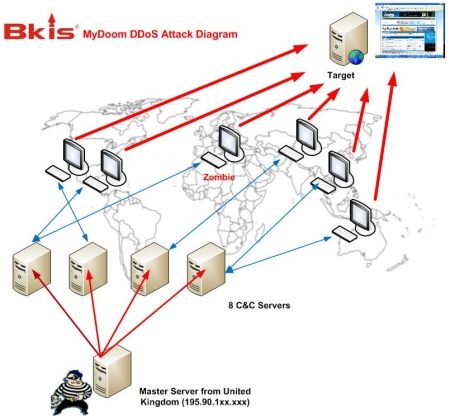
How to Limit Denial of Service (DOS) Attack Damage


You may not think you are at risk of a DOS attack, especially if you operate a small web site, but if you cross paths with the wrong person, you could end up in the cross hairs of someone who could take your site down. Many smaller sites are finding themselves under attack these days because they are most vulnerable.

Resisting off a DOS attack can be a very difficult task. Once your site is under attack, you are really pretty limited in the way you can respond. The following steps will not only help you minimize the damage a DOS attack can inflict on your business, but help reduce the chances of one taking place at all.

1. Be familiar with your hosting company

As part of your hosting selection process, be sure you have a complete understanding of their security measures. Check with them on how they will help you should your site come under attack. Do they have a team of security experts that will assist you? What kind of prevention measures do they take at the network level?

2. Keep Operating Systems and Software up to date

Your host isn't the only responsible party. Security holes in operating systems as well as software programs can also be responsible for allowing DOS attacks. Be sure your anti virus and spyware programs are up to date at all times on all the machines you use in your business. Be sure you've got your computers set to download security updates to your OS and other software programs automatically.

3. Increase server capacity

The more server capacity you have, the better off you'll be to handle your traffic and fend off a DOS attack. A DOS attack works by increasing the demand on your site and takes it to a point where there is no more capacity to allow more visitors on the site. With larger capacities, you can help stave off smaller DOS attacks.

4. Report all attacks

If you find your site under attack, report the attack to the FBI immediately. The FBI maintains a specific division to handle these situations. The Internet Crime Complaint Center, or ICC, handle a myriad of Internet complaints, from fraud to DOS attacks. They can be reach at ic3.gov.

5. Block the additional traffic

Working with your hosting company, you can actually block traffic coming from what appear to be suspicious IP addresses. Your hosting company will likely have a list of known problem IP addresses and can also find out where the majority of the increased traffic is coming from and block it. Sure, you could end up blocking legitimate customers, but this until the problem is resolved, at least your site would continue to operate.

6. Be on top of things

As these DOS attacks continue to increase, both in the type of attacks as well as the frequency, you've got to stay on top of security issues. The best way to prevent attacks may just be with your knowledge of what's going on at any given point in time. Do a search online for message boards / forums / blogs that discuss such issues and read them on a regular basis so you'll know what's happening regarding DOS attacks. A great site for keeping on top Internet security issues is the Computer Crime Research Center. You can find them at crimeresearch.org

This article has been posted by Warren. Warren has been writing articles and producing how to courses online since 2005. He specializes in online business issues and currently operates a number of websites in a number of different niches.
got from Amarajit.. 


Further Readings:

Thursday, July 29, 2010

How to run an infinite ping


How to run an infinite ping against your server
The 'ping' command in Windows Server is a tool used in checking to see if a specific domain name or IP address is responsive by attempting to send it four very small packets of data, measuring the amount of time in milliseconds it takes the packet to reach the address. If the data is received, the ping is successful. If it is not, it will time out.
By default, the 'ping' command will only send four packets. However, the 'ping' command can be used to send an infinite number of these small packets to the IP address. It is useful in such cases where a server is being rebooted, and you wish to ensure the server restarts correctly.
To run an infinite ping, first open the MS-DOS Command Prompt, by navigating to 'Start' and clicking 'Run'.

Once the 'Run' window is open, type 'CMD', and press Enter. You will then be at a Command Prompt.

Next, type in the following command, where [IP address] is the address you wish to ping, and press Enter:
ping [IP address] -t

Once entered, the prompt will then endlessly ping the IP address or domain name until the command is stopped by holding down the 'Control' key and pressing 'C'. You can also stop the ping by closing the DOS prompt window.
IMAGE SUBJECTED TO Hackfreak

How to Block an IP Address using IPSec

How to Block an IP Address using IPSec

This article will walk you through how to block an individual IP address from accessing your server, using an IPSec Security Policy.
For various reasons, you may find yourself wanting to block a specific IP address from accessing your server.
Simply following these instructions showing how to create an IPSec Security Policy specifying to block access to a specific IP address.

Click on the Start Menu and Click on Run.


Type "secpol.msc" and Click OK.


When the Local Security Settings console opens, Click on "IP Security Policies on Local Computer".


Right Click in the Right Window Pane and Click "Create IP Security Policy".


Click Next when the Wizard opens.


Here you can name your new IPSec Security Policy. In this example, we named it "Blocked IPs". When you are ready, Click Next.


Click Next


Click Next


Click Yes


Click Finish


Uncheck the "Use Add Wizard" checkbox, then Click "Add...".


Click the "Add..." button.


Uncheck the "Use Add Wizard" checkbox, then Click "Add...".


Click the dropdown menu for "Source address" and choose "A specific IP Address".


Here is where you enter what IP address you want to Block. In this example, we are going to block "129.12.74.220".

Click the dropdown menu for "Destination address" and choose "My IP Address", then Click OK.


Click OK


Select the newly created Filter, and click on the "Filter Action" tab.


Select the "SI - Deny" Rule and Click Apply.


Click OK, then Apply and OK again to get back to the main console window.

Right Click on the newly created IPSec Security Policy, and select "Assign".


If successfull, it should state that the policy is assigned. Your server is now blocking all requests to that specific IP address.

Monday, July 26, 2010

FIND IP ADDRESS THRO YAHOO MESSENGER


IP is an address used by a person to connect to the internet. An Internet Protocol address also mean the identity of the person in the World Wide Web. Internet Protocol also has the information of location where the person is stays and connects to internet. If the person who connects to internet doesn’t use proxy, we can track the location of her or his country by knowing his IP (Internet Protocol Address). Internet Protocol Address sometime can also track the city where the person location is.

I want to share my knowledge about getting or finding person location by using yahoo messenger. Sometime when we are chatting with a friend via Private Message or Instant Message (PM or IM), we curious where the place of our friend is. If you using official yahoo messenger it is an easiest way to find your friend Internet Protocol address. Please read my tutorial below carefully and I guarantee you will be able to track and find the Internet Protocol Address of your friend.

First step we must to do is get a PM or IM with your friend user name or id. Then try to send a file (picture, mp3, etc), then wait until your friend accepted your file and your file begin transferred to him. If your and your friend connection has a huge bandwidth, I suggest you, to send a bigger byte of file. You also don’t have to do this step if you have their web cam yahoo messenger. After you done this thing, do the next step below (you can do this step before send a file).

Go to the command prompt application. If you don’t understand just follow this step (windows XP):

Start >> Run >> cmd >> Enter

Or

Start >> Programs >> Accessories >> Command Prompt

You will see a windows command prompt appear. Then write a command “netstat –n” or netstat –a” and press enter. Please note that the symbol “ not included when you type that command. You will see information under Active Connections list of Proto, Local Address, Foreign Address and State.

Active Connections indicate the connections being connected to your computer. Proto show the protocol you use to. Local Address refers to Internet Protocol in you LAN connection. Foreign Address indicates the Internet Protocol connection that connect to you and the port they used.

Now you just to seek a remote port that used by foreign address. Usually remote port 80 or 81 is used to transfer a file. Remote Port 5050 used for private message. And 5100 used for web cam. And Remote Port 5000 or 5001 used for voice chat.
The IP address of PM not the real IP of your friend. It belongs to yahoo server IP. But if you send a file or receive a web cam you will be get a real IP of your friend address because yahoo use Peer to Peer connection to service this utility.

sharp ip getter

If you want a better way to get Internet Protocol of your friend, there are many software that designed and developed to get IP address. One of this software I ever tested and worked is Sharp IP Getter. We do not need to send a file or get a web cam to know the Internet Protocol of your friend. We only need have Private Message.

about sharp ip getter:

Sharp IP Getter is an application that has a purpose to find Internet Protocol of Yahoo Messenger through Instant Message Service. Whenever you chat with people in Yahoo Messenger Private Message or Instant Message, Sharp IP Getter will help you to find the real IP address of the current people or user that being chat with you. Sharp IP (Internet Protocol) Getter was developed and created by Www.Sharp-Soft.Net.

How to find IP address from Yahoo Messenger chat? How to find ip address of a person in yahoo messenger? how to get ip in yahoo messenger? how to find ip address from instant message in yahoo messenger?. Those all questions might be ask from people who wanna know how to get ip address from yahoo messenger.

Actually there is a simple steps using command prompt windows to find ip address from chat in yahoo messenger, but this is not the good time We give you that such ways, to get ip of Y!M, because without that steps, with Sharp IP Getter you already knew how to look for the IP address of a user or people in yahoo messenger.

How to use Sharp IP Getter:

Just run the software and instantly you will see a list of IP address in the software. That IP address should be the one / people who chat with you. If you are unable to see the IP, make sure you send a file or image aka photo to the target and the IP address of the target will rise at Sharp IP Getter.


http://www.plunder.com/Sharp-IP-Getter-download-66676.htm


Tuesday, May 11, 2010

Crack Protected PDF Password files

Crack Protected PDF Password files


Wanna Unlock PDF Password File


Go there


www.freemypdf.com

Home made Laptop Security lock with USB drive

Home made Laptop Security lock with USB drive


Here is an interesting tip shared by one of our readers James for securing your laptop with a home made lock using your old USB drive.
Hi, I am submitting a tech tip for your blog readers.
—————–
A New Life To Old Flash Drives.   Don’t throw your old USB flash drive away. Instead, you can use an old flash drive to prevent your laptop from being stolen. Here is how.
  • Install free software on your laptop. http://www.lalarm.com/LaptopAlarm. (free for personal use)
  • Fasten a neck strap to your old USB flash drive.
  • Fasten the other end of the strap to a table.
  • Plug in the USB flash drive into a USB port of a laptop.
  • Lock the laptop by pressing the Windows logo key and L key together.
  • Define zones like Home or Friends where you know laptop would be safe.
  • Send alert to Mobile Device.
  • Destroys all your personal data if configured. This tip is also useful if you worry about identity theft.
Alarm
When a thief removes the laptop from the table, the USB flash drive will be disconnected from the laptop and then a loud siren sound will be emitted.
Lock laptop
(See More photos: http://www.lalarm.com/arm2)

How to Survive a Heart Attack when you are alone?

Heart Attack is something very common these days, earlier, it was something found only in people of age group like late 40s or 50s, hardly we use to come across this problem in 20s and 30s age group. However these days due to changes in lifestyle and working environment, the trend has changed and due to which the heart attack cases in 20s and 30s have increased.
Generally the reasons for a heart attack could be –
  • Excessive Smoking – Smoking is the major cause of arteries getting clogged, hence the blood pressure rises, resulting into a major cause of Heart Attack.
  • Excessive Drinking – Alcohol raises your blood pressure, making you more prone to Heart Attacks.
  • Getting angry very often is another reason for heart attacks.
  • Getting stressed out.
  • Losing control over your cholesterol level.
  • Over exerting yourself, etc.
Mostly Heart Attacks are caused as a result of a condition known as – Coronary Artery Disease. In Coronary Artery Disease, a fatty material called plaque covers up the inside walls of the coronary arteries (these are the arteries which supply blood and oxygen to the heart). Eventually, an area of plaque can rupture, causing a blood clot to form on the surface of the plaque. If the clot becomes large enough, it can mostly or completely block the flow of oxygen-rich blood to the part of the heart muscle fed by the artery. [Read More...]

Heart attack diagram
Now, it could be a Heart Attack, if suddenly you start experiencing severe pain in your chest that starts to radiate out into your arm and up into your jaw, and the situation worsens if you are alone at this moment.
What to do in this situation ?
  • Do not panic, but start coughing repeatedly and very vigorously.
  • A deep breath should be taken before each cough; the cough must be deep and prolonged, as when producing sputum from deep inside the chest.
  • A breath and a cough must be repeated about every two seconds without let-up until help arrives, or until the heart is felt to be beating normally again.
Deep breaths get oxygen into the lungs and coughing movements squeeze the heart and keep the blood circulating. The squeezing pressure on the heart also helps it regain normal rhythm. In this way, heart attack victims can get to a hospital.
However, dont forget or delay your hospital visit after this. This information has been collected from various sites, and a session on heart care, which I got to attend recently.

Wednesday, April 14, 2010

American Accent training Free Downloads


After you have downloaded the zip files, unzip it and enter this password: pinoybisnis
Click the link: Improve Your American English Accent to Download eBooks.
Click the link: Improve Your American English Accent to Download CD 1
Click the link: Improve Your American English Accent to Download CD 2
Click the link: Improve Your American English Accent to Download CD 3
divider
Title: Accent Reduction Made Easy
Size: 164 Mb
Format: PDF + MP3
Click the link Accent Reduction Made Easy to download ebook
Click the link Accent Reduction Made Easy to download CD 1
Click the link Accent Reduction Made Easy to download CD 2
Click the link Accent Reduction Made Easy to download CD 3
Designed for anyone desiring to speak English with Standard American pronunciation, this popular program includes a comprehensive illustrated Listening Guide for reference. This course features a variety of drills and exercises to improve and practice correct English pronunciation. Both professionals and non-professionals will find this program effective as well as easy and convenient to use at home, in the car or anywhere. Author Jane Wellborn has helped thousands improve their speech and along with that, improved their social and professional lives.
divider
Title: Resumes That Get You Hired